
Area and window snips
Free-form area or a single window, your choice.
Take beautiful screenshots in Windows. ScreenshotX is a free, lightweight Windows snipping tool for quick screen capture.
Center your content, add a pretty background, blur sensitive details and share in one click. For free, and no account needed.
Latest version: 1.1 - Changelog - License: Freeware. Download size: 3.0 MB
Works in Windows 11, 10, 8 and 7.
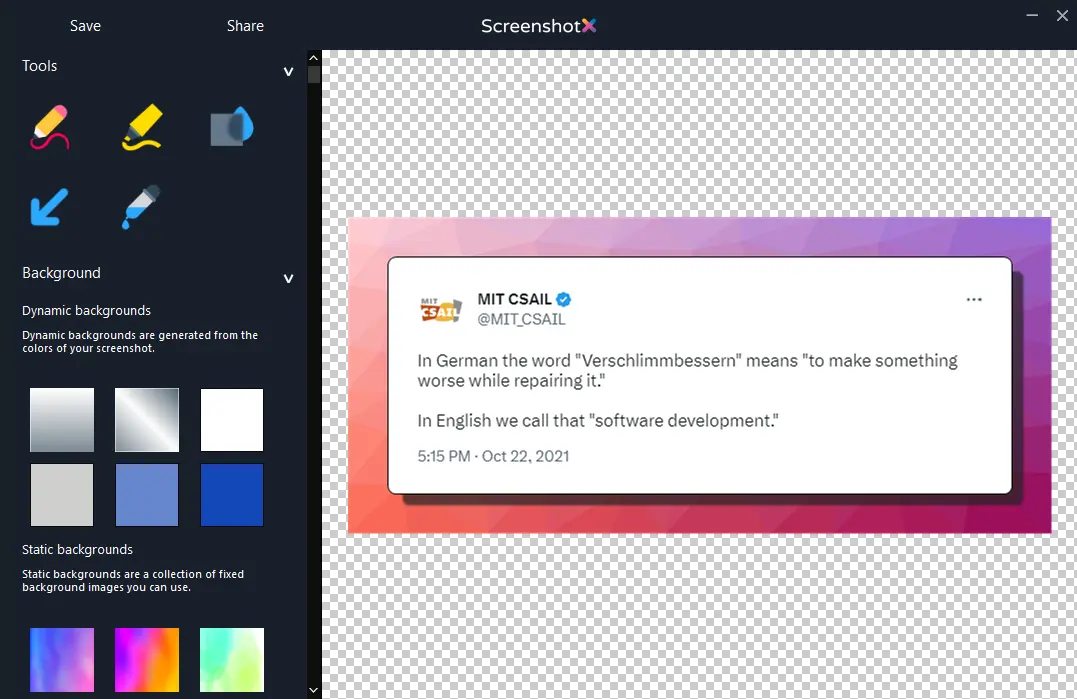
Taking pretty screenshots in Windows doesn’t have to be complicated. ScreenshotX makes it quick and easy.
Capture an area or a window. It will open in the editor.
Automatic balancing. Automatically centers your content. Add a pretty background. Blur sensitive details. It’s your screenshot - it should look pretty like you.
Copy it, save it, or click Share for an instant link. No account needed. This what the shared screenshot links look like: https://screenshotx.com/i/111111
It’s hard to keep your life in balance. Or your screenshots. That’s why ScreenshotX automatically centers your content so at least your screenshots look well balanced.
Free-form area or a single window, your choice.
Content is centered on detected solid backgrounds.
Frame any snip on a clean color in one click.
Draw freehand right on the screenshot.
Pull attention to the part that matters.
Grab any color, with its complementing colors shown.
Hide sensitive details before you share.
Instant link, no sign-up.
A 3.0 MB Windows app. No spyware, no ads.
The app follows your taste, like this page.
Labels and callouts are on the way.
Switch any time under General Settings.
Click Share and the screenshot is uploaded. You get a public link to send, plus a private admin link to see its stats or delete it. Shared screenshots are removed automatically after 30 days.
All built in, nothing extra to download. Change the language from General Settings.
English · Chinese · Czech · Danish · Finnish · German · Greek · Hindi · Indonesian · Japanese · Korean · Malay · Norwegian · Portuguese · Romanian · Slovak · Spanish · Thai · Turkish · Ukrainian · Vietnamese
v1.1 · 3.0 MB · Windows 11, 10, 8, 7 · Freeware
Released · Read the changelog
Installs like any normal Windows program, with a Start menu entry and uninstaller.
ScreenshotX_Setup.exeA single executable. Run it, use it, delete it when you’re done. Nothing is installed.
One file, very little commitment.
ScreenshotX_Portable.exe